How Sunworker works
A shift on Sunworker has four steps: request, accept, work, settle up. The venue pays into escrow when booking, and the professional receives the money after the shift.
Choose a path
Step 1: Register your venue
Name, address and contact person. It takes a few minutes and costs nothing.
Step 2: Find a professional
Filter by role, postcode and date. Every profile shows the hourly rate, experience, reviews and credentials.
Step 3: Request a shift
Enter the date, time and location. The professional accepts or declines; the shift only becomes binding once they accept.
Step 4: Work and settle up
The professional checks in and out on site. You are billed for the actual time worked, and the receipt appears in your account afterwards.
Restaurant, hotel, bar, staff canteen or catering.
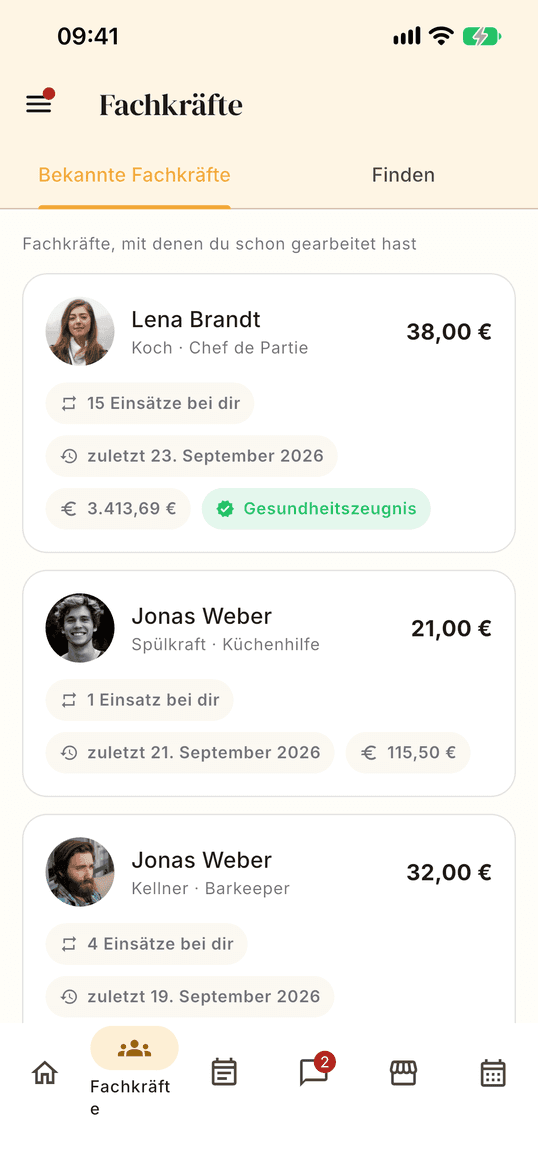
This is what search looks like in the app: role, place, date — and matching professionals with hourly rate and rating.
Step 1: Create your profile
Roles, experience, languages, travel radius — and the hourly rate you set yourself.
Step 2: Upload your credentials
Food hygiene certificate under § 43 IfSG, hygiene training, qualifications. Every credential has an expiry date and is checked.
Step 3: Accept requests
You see the date, time, location and pay before you accept. You decide whether to take the shift.
Step 4: Work and get paid
Check in and out at the venue, and your payout runs automatically afterwards. The venue has already paid.
Chef, chef de partie, sous chef, pastry chef, waiter, service staff, bartender, sommelier, host, kitchen porter or kitchen assistant.
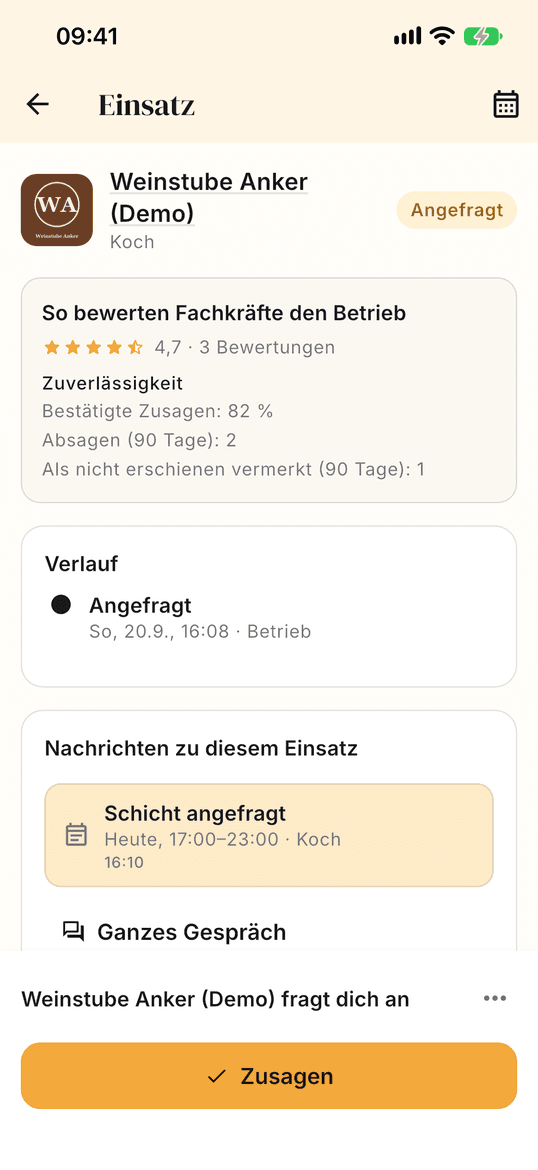
This is how a request arrives: date, time, place and pay are fixed before you accept.
Why Sunworker
Book hospitality staff without temp agencies or paperwork
Verified professionals for restaurants and hotels
Every professional uploads their documents: health certificate, hygiene training, qualifications. Each document has an expiry date and is checked before it appears on the profile. On top come ratings from real shifts — only those who worked can rate.
Self-employed professionals instead of temporary agency work
On Sunworker you book self-employed chefs, waiters, service staff and bartenders directly. Professionals set their own hourly rate and decide which shifts they accept. Sunworker arranges and handles the payment, but does not employ or hire out anyone.
Invoices and bookkeeping included
After every shift Sunworker issues the invoice in the professional’s name, and the business receives its receipt in its account automatically. Connect Lexware Office or sevDesk to have receipts transferred there; for your tax adviser there is the DATEV export.
How the money flows
From collection to payout — the money never sits with one side alone.
Collection
Once the shift is agreed, the full amount is collected immediately from the stored payment method — for venues including the service fee. Without a successful payment, nothing is confirmed.
Escrow
The amount sits in the platform account until completion and during this time belongs to neither the client nor the professional. After check-out, the actual time is billed: extra hours are charged, a shorter shift is refunded.
Clearing
Then 72 hours begin during which a dispute can still be resolved — the same for every professional.
Payout
After clearing, and as soon as the invoice is available, the money goes to the professional minus the commission. The receipts are then available in both accounts.
Professionals you can book
Temps and experts for kitchen, service and bar — at short notice for one evening or regularly for the season.














Book staff at short notice
Chefs, waiters, hostesses or kitchen help for hire: what a shift costs, when it pays off and how booking works.
Frequently asked questions
How quickly can I find temporary hospitality staff?
Search by role, postcode and date and you immediately see who is available. The request goes straight to the professional; once they accept, the shift is binding.
What does Sunworker cost for businesses?
The account is free. You pay the professional’s hourly rate and a service fee — only once a shift is confirmed. You see all amounts before you send the request.
How do I get paid as a professional?
The business pays into escrow when booking. After the shift and a 72-hour clearing period the money goes to your account minus the commission — no chasing payments.
Do I have to write invoices myself as a professional?
No. Sunworker issues the invoice for every shift in your name. You can also upload your own invoice if you prefer to write it yourself.
What if a shift is shorter or longer?
The actual time between check-in and check-out is billed. Extra hours are charged, a shorter shift is refunded.
Ready for your first shift?
Creating an account is free. You only pay or earn once a shift is confirmed.